Plex server content not showing

Hi,

I purchased the premium so that I could use the Plex server, but having some issues setting it up.

I have a local plex server at 192.168.1.131. Using network discovery on Yatse successfully finds my server and all tests are successful. I also checked the excluded libraries, and all libraries show up. However, on the actual interface, “Files” is empty and I don’t have any other tabs. My goal is to use the Yatse app to cast from Plex server to Plex for HTPC client running on my PC. I am able to see the Plex for HTPC client when I select cast on Yatse, but I am unable to control it. I have tested from the mobile Plex app which successfully casts to my PC client.

I’ve attached the debug logs for doing Cast > Plex for HTPC.

I would appreciate any help ! Thanks for developing this app.
debug.log (53.0 KB)

Your server says the ip of the client is 127.0.0.1 as it probably runs on the same device as the plex server.

2025-12-17 08:44:02.592 Verbose PlexLogger  ← [821] {“MediaContainer”:{“size”:1,“Server”:[{“name”:“FIGFIG”,“host”:“127.0.0.1”,“address”:“127.0.0.1”,“port”:32400,“machineIdentifier”:“sjbn0dn8kezc1b2uv1n1msud”,“version”:“1.71.1.346-f62ce923”,“protocol”:“plex”,“product”:“Plex HTPC for Windows”,“deviceClass”:“pc”,“protocolVersion”:“2”,“protocolCapabilities”:“timeline,playback,navigation,playqueues,provider-playback”}]}}

Meaning Yatse have no way to connect

I noticed that and was confused - my plex client is running on my PC and the plex server is running on my home server. Both separate machines.

Perhaps may need to change something in plex server settings.

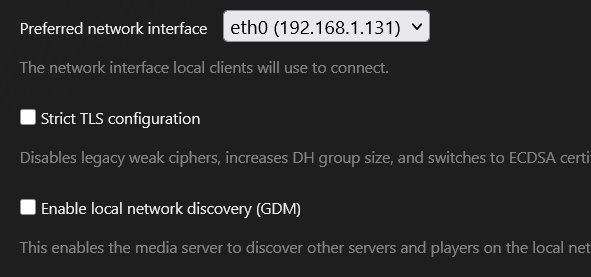
Just to update - I was able to fix this issue by doing the following in Plex server settings:

  • Uncheck local network discovery
  • Set network interface

You can confirm this works by navigating to http://ip:32400/clients?X-Plex-Token=token and checking the output.
